


The Thrill login page provides registered users with secure access to the casino lobby, sportsbook, esports markets, wallet, rewards and account settings. One account connects all available sections of the platform, allowing users to review balances, manage transactions, track XP progress and return to recently played games or open bets.
Account access is subject to age, location and verification requirements. Users should always open the correct Thrill website directly and avoid login pages shared through unsolicited messages, unofficial advertisements or unknown third-party websites.
How to Log In to Thrill
- Open the official Thrill website in a supported browser.
- Select Login in the main navigation or account area.
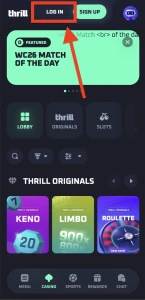
- Enter the email address connected to the registered account.
- Enter the account password.
- Complete any additional security check displayed on the screen.
- Select Login to open the account dashboard.
The email address must match the one used during registration. Passwords are case-sensitive, so capital letters, numbers and special characters must be entered exactly as they were originally created.
Users signing in from a new device, browser or location may be asked to complete an additional verification step. This helps protect the account against unauthorised access.
Accessing the Thrill Casino and Sportsbook
A successful Thrill login opens access to the main account features available in the user’s jurisdiction. The same profile is used for casino games, sports betting, esports and account rewards, so there is no need to maintain separate login details for each section.
The account dashboard may provide access to:
- Casino and live dealer games;
- Thrill Originals;
- sports and esports markets;
- deposits and withdrawals;
- active bets and game history;
- rewards and XP progression;
- transaction records;
- profile and security settings;
- responsible gambling controls;
- customer support.
Game availability and betting options may vary according to location. Users in Australia should review local requirements and must not attempt to bypass regional restrictions or location controls.
Forgotten Password and Account Recovery
A forgotten password can be reset through the recovery option displayed on the login page. Select Forgot Password, enter the registered email address and follow the instructions sent to that inbox.
The recovery email may take several minutes to arrive. The spam, promotions and junk folders should be checked before submitting another request. Multiple reset attempts can cause earlier links to expire, so the newest email should be used.
A new password should be unique and should not match passwords used for email, cryptocurrency exchanges, wallets or other gambling accounts. Strong passwords normally include a mixture of uppercase and lowercase letters, numbers and special characters.
Customer support may be required when the registered email address is no longer accessible. Identity or account ownership checks can be requested before any login information is changed.
Two-Factor Authentication
Two-factor authentication adds another security step after the password has been entered. When enabled, access requires a temporary verification code generated through the connected authentication method.
This protection is particularly important for accounts containing cryptocurrency balances or saved transaction information. A stolen password alone may not be enough to access an account protected by two-factor authentication.
Authentication codes should never be shared with another person. Thrill support does not need a current security code to investigate an account issue. Requests for passwords, authentication codes, private keys or wallet recovery phrases should be treated as suspicious.
Backup or recovery information connected to two-factor authentication should be stored securely. Losing access to the authentication method may require an additional account recovery and verification process.
Thrill Login on Mobile Devices
The platform can be accessed through a compatible mobile browser. The mobile version keeps the main casino, sportsbook, wallet and reward functions available on smaller screens without requiring a separate account.
For a stable mobile login:
- Use an updated browser;
- maintain a reliable internet connection;
- avoid public or unsecured Wi-Fi;
- confirm that the website address is correct;
- close shared browser sessions after use;
- do not save passwords on a public device.
Mobile users may remain logged in when the browser is left open. The account should be signed out manually when using a shared phone, tablet or computer.
Live casino games and some sportsbook features require a stable connection. If a connection is interrupted after a wager has been submitted, the account history should be checked before the same action is repeated.
Common Login Problems
Login difficulties are often caused by incorrect credentials, browser settings or temporary security checks.
An incorrect password message can appear when the wrong letter case is used or when an old saved password is filled automatically. Entering the password manually or completing a reset may resolve the issue.
If the login page does not load correctly, clearing browser cache and cookies or trying an updated browser may help. Privacy extensions, VPN services and location-masking tools can also interfere with security and regional checks.
Repeated unsuccessful attempts may temporarily restrict access. Waiting before trying again or contacting support is safer than continuing to submit different passwords.
Account access may also be limited when verification is incomplete, unusual activity is detected or the user is connecting from a restricted jurisdiction.
Account Verification
Thrill may request verification to confirm age, identity, location or ownership of funds. Verification can be required during registration, after login or before a withdrawal is processed.
Requested documents should only be uploaded through the secure account interface or another official support channel. Images should be clear, current and consistent with the information registered on the account.
False personal details, multiple profiles or payment methods belonging to another person can result in account restrictions. Each user should access only their own account and complete verification using accurate information.
Protecting a Thrill Account
Account security depends on both platform controls and user behaviour. The following practices reduce the risk of unauthorised access:
- Create a unique password;
- enable two-factor authentication;
- secure the registered email account;
- review recent account activity;
- check withdrawal addresses carefully;
- avoid sharing devices with unknown users;
- ignore unsolicited bonus or support messages;
- sign out after using a shared device.
Phishing pages may copy the appearance of the Thrill casino login screen. Before entering any information, the website address should be checked carefully. A page promising guaranteed winnings, private rewards or urgent account verification through an unknown link should not be trusted.
Support for Login Issues
Customer support can assist with password recovery, verification problems, locked accounts and unrecognised activity. The registered email address, a description of the issue and the approximate time it began can help with the investigation.
Screenshots may be useful when they show an error message, but passwords, authentication codes, wallet seed phrases and private keys must be removed or hidden.
Support may ask for verification before restoring access or changing sensitive account information. These checks are intended to protect the account from unauthorised recovery attempts.


